Cash application automation uses AI agents and matching logic to apply incoming customer payments to the right invoices, entities, and ERP records with minimal manual review. For $200M+ companies processing 5,000+ payments monthly, matching by hand can tie up 2–3 full-time employees. At a $75,000–$100,000 loaded cost per person, that’s $150,000–$300,000 a year spent matching cash the business has already received. Faster cash application gives finance a clearer view of where each payment belongs. That makes reconciliation cleaner and helps treasury use collections data sooner in the 13-week forecast. Ahead, you’ll learn how cash application automation works, where manual matching starts to break, and why applied cash needs to connect to the workflows treasury owns.
What is cash application?
Cash application is the process of matching incoming customer payments to the invoices they settle and posting those payments in the accounting system. It connects the bank statement, where money arrives, to the ERP, where receivables are tracked.
In a low-volume business, this is mostly a posting task. One customer pays one invoice with a clear reference, and the receipt gets applied.
At scale, cash application becomes a control point for cash visibility. Payments may look close enough to match, but still need remittance support, entity context, or variance approval before finance can post them confidently.
Most of that work comes from five failure points:
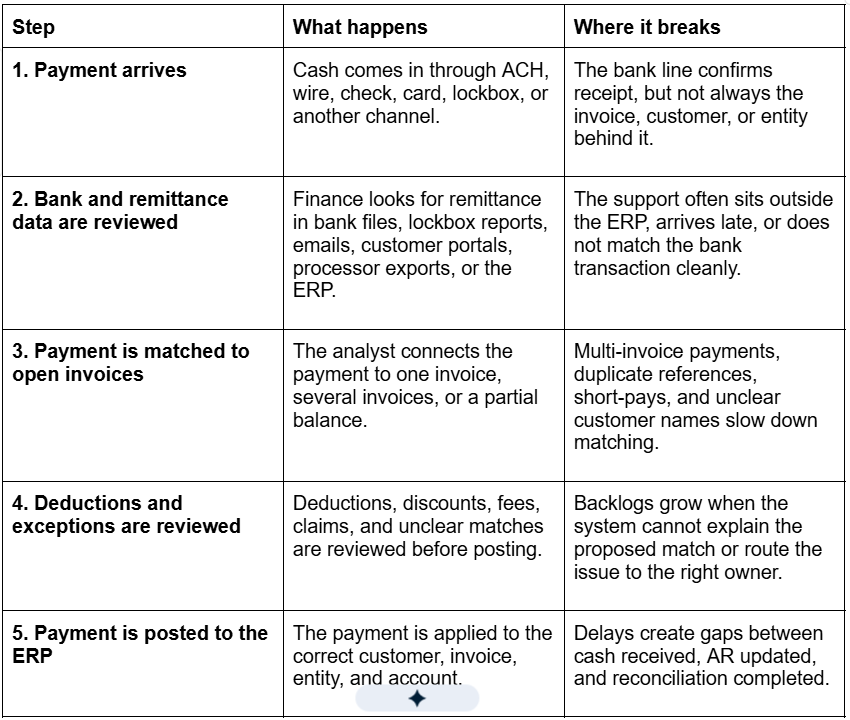
When cash application slows down, finance may see cash in the bank before it has the context needed to use it. That delay carries into reconciliation and leaves the forecast working from stale collections data.
Why manual cash application breaks at $200M+ revenue
At $200M+ revenue, cash application starts requiring decisions the ERP was not designed to make. Basic rules can clear simple one-to-one payments, but they struggle when matching depends on remittance support, entity context, settlement detail, or approval history. That’s where the process stops scaling with headcount.
1. Transaction volume compounds small exception rates into large queues
At 5,000 payments a month, even a 20% exception rate leaves 1,000 payments for manual review. The queue also tends to grow at the worst times: during close, after large customer payment runs, or when a new entity adds unfamiliar invoice and customer patterns. The bigger issue is that many “exceptions” are not true exceptions. They are routine payments with incomplete references or small variances that the ERP cannot resolve on its own. Adding another analyst may reduce the queue temporarily, but it doesn’t change why routine payments keep falling into review. The cost of cash application stays tied to transaction growth.
2. Remittance doesn’t arrive ready to post
The bank transaction confirms that cash arrived, but it doesn’t always show which invoice the customer intended to pay. For instance, a customer may send remittance by email after the wire clears. Or a lockbox file may use a reference format the ERP doesn’t recognize. At lower volume, analysts can chase those details manually. At scale, that follow-up becomes daily production work. Your team spends time assembling support before it can make a posting decision. Matching logic only works when the system can read the support. If the remittance sits outside the workflow or arrives in a format the ERP cannot interpret, routine payments keep falling into review.
3. Entity-level posting errors create cleanup later
In a multi-entity business, matching the customer isn’t enough. The payment has to post against the correct receivable record. This is common in PE-backed companies and roll-ups. One customer may send a single payment for invoices spread across multiple entities. Or a newly acquired company may still use legacy customer names and invoice formats that don’t match the parent company’s ERP setup. If the cash is applied to the wrong entity, the issue usually surfaces later as intercompany cleanup, AR aging noise, or a reconciliation break. The match “looked close,” but the posting was wrong. As receivables spread across ledgers, the process starts depending on manual lookup across systems. That adds processing time and increases posting risk.
4. PSP deposits hide the transaction detail behind the settlement
PSP deposits usually don’t arrive in the bank as one clean customer payment. By the time Stripe, Adyen, PayPal, or another processor sends cash to the bank, several customer transactions may be bundled into one deposit. That deposit may also be reduced by fees, refunds, chargebacks, reserves, or timing differences. That creates a gap between the bank and the ERP. Your bank shows one net settlement, while your ERP holds the invoice- or order-level detail. Finance has to connect the two before cash can be applied correctly. When analysts rebuild that settlement logic every cycle, cash application turns into pre-reconciliation. The work is repeatable, but it’s not scalable when the same PSP patterns show up across thousands of transactions.
5. Short-pays get stuck when ownership is unclear
Short-pays aren’t always simple posting decisions. A discount may be valid under the customer’s terms, while a deduction or dispute may need approval from finance, sales, or the customer owner. Analysts can identify the variance, but they need a clear policy and owner before the payment can be cleared, disputed, or written off. Without that routing, payments stay open while analysts chase approvals manually. The same deduction patterns keep coming back because there’s no consistent path for resolving them.
6. Fragmented ERPs prevent one receivables view
Many $200M+ companies don’t have a single, clean receivables environment. One business unit may run NetSuite, another may run Sage, and a recent acquisition may still use a legacy ERP. ERP-native rules work inside those systems, but they don’t automatically create one normalized invoice population. Customer names, invoice formats, and payment references can still vary by business unit or acquisition. That leaves your team to interpret payments across disconnected systems. The more fragmented the environment, the more the process relies on analyst memory and manual lookup rather than repeatable matching logic.
What is a good cash application automation benchmark?
A good benchmark for cash application automation is straight-through posting rate: the percentage of payments matched and posted to the ERP without analyst review.
Match rate alone can be misleading. If a system suggests a match but leaves the receipt in a review queue, your team still has to touch the payment. Straight-through posting shows whether automation is actually changing team capacity.
If you process 5,000 payments a month with a dedicated cash application function, the benchmark might look like this:
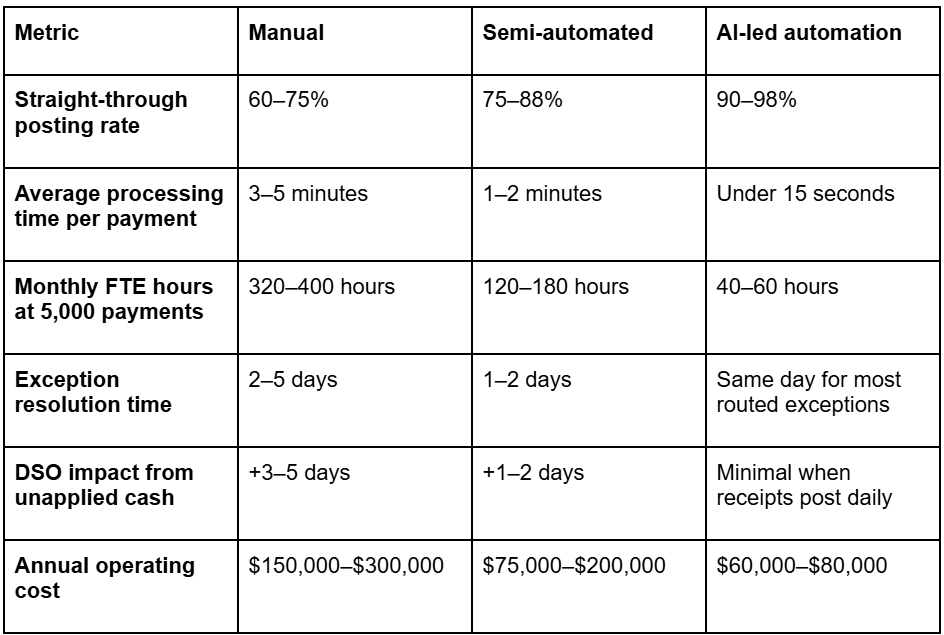
Note that annual operating cost includes loaded labor cost and, where relevant, software cost. These are modeled benchmarks, not universal averages. Your own numbers will depend on payment mix, remittance quality, ERP setup, exception volume, and how much review remains before ERP posting. That said, the operating case is straightforward. A 3-person cash application team can cost $225,000–$300,000 a year at a $75,000–$100,000 loaded cost per employee. If automation removes 1.5–2 FTE-equivalents of routine matching work, the modeled savings can reach roughly $90,000–$200,000 a year after a $60,000 platform investment. Replace 1.5 FTEs for $60K/year. See the math in a live demo.
How Nilus’ connected cash application framework works
To automate cash application, finance first needs to connect the data analysts usually pull together by hand: payment activity, remittance support, open receivables, and ERP posting rules. Nilus’ Connected Cash Application Framework brings that context into one workflow, so clean receipts can post automatically while short-pays, missing support, and unclear matches route to the right reviewer before they create cleanup later. Here’s how it works.
1. Connect every source of incoming cash
Start with every place customer cash enters the business, including operating accounts, lockboxes, entity-level bank accounts, settlement accounts, and acquired-bank relationships your team still reviews manually. For a $200M+ company, customer cash rarely arrives through one clean channel. If one source stays outside the workflow, analysts still have to keep matching part of the receivables population by hand. Once the sources are connected, review the quality of the intake data before building matching logic. Bank statements, lockbox files, payment references, and ACH addenda should give the system enough context to identify the customer, invoice, entity, and posting path. If that data arrives stripped, delayed, or disconnected from remittance support, automation just recreates the same review queue in a new system.
2. Connect and normalize ERP receivables data
Once payment data is flowing in, connect the receivables data the system will match against. That means open invoices, customer records, credit memos, payment terms, unapplied cash, and entity ownership. Then clean the fields that decide whether a receipt can post correctly. Invoice number, customer name, payer name, balance, and entity need to be consistent enough for the system to trust the match. This is also where you normalize the records analysts usually clean up by hand, such as payer aliases, parent-child customer relationships, and inconsistent invoice references. For multi-ERP companies, this step should create one matching-ready receivables view. Payments should match against the full open receivables population, not whichever ERP an analyst happens to check first.
3. Build a matching hierarchy around posting confidence
Don’t configure matching as one broad ruleset. Start with the receipts your team would trust enough to post without review. The first layer should cover exact matches. The payment reference points to one open invoice, the customer is clear, the amount matches, and the entity is correct. These receipts should be the first candidates for straight-through posting. The next layer should cover known customer patterns. For example, a payer may use purchase order numbers instead of invoice numbers, or a customer reference may always map to the same account. These matches can still be automated if the pattern is consistent and documented. Each layer needs a clear stop point. If the system finds two possible invoices or an entity conflict, it should hold the payment for review instead of forcing a match. If you receive PSP deposits, build a separate matching path for those receipts before invoice-level logic. Net settlements need to tie back to the settlement file first, so finance does not have to rebuild the payout explanation later.
4. Route short-pays, deductions, and partial payments
Short-pays shouldn’t sit with cash application just because no one has defined what happens next. Decide which variances can clear automatically and which ones need review. For example, an early-payment discount can move through if it matches the customer’s terms, while a larger deduction should route to the person who can approve, dispute, or write it off. Use reason codes to make that routing consistent. Each code should tell the workflow what happened, what action to take, and who owns the decision: clear the variance, hold the payment, request support, or send it to an approver. This keeps analysts from becoming the holding area for deduction decisions that belong with customer owners or finance leads.
5. Auto-post supported matches to the ERP
Auto-posting is where automation removes work instead of just organizing it. First, define what qualifies as a supported match. The system should only post when the customer is identified, the invoice is open, the amount matches or falls within an approved variance, the entity is correct, and the ERP period is open. Next, define what should block auto-posting. A payment should route to review if two invoices look plausible, the entity is unclear, the variance is outside policy, the customer is inactive, or the ERP period is closed. For every auto-posted receipt, preserve the evidence behind the decision. This includes the source payment, remittance support, matching rule, variance treatment, and approval history. That gives finance the audit trail it needs without making analysts recheck clean receipts. Once the receipt is posted, the same payment record should support reconciliation and forecasting instead of being rebuilt in another workflow.
6. Route unresolved exceptions with context
When a payment needs review, route it by exception type: missing remittance, duplicate invoice matches, customer alias conflicts, entity mismatches, short-pays outside policy, deductions needing approval, or PSP settlement breaks. Assign an owner and next action for each type. A missing-remittance item may need support from the customer or lockbox file. A deduction outside policy may need approval from the customer owner or finance lead. Make sure each exception reaches the analyst or approver with the context needed to act: the payment, likely customer, likely invoice, reason it was held, missing support, variance amount, entity, and recommended action. Once the analyst resolves the item, capture the outcome. If your team keeps approving the same payer relationship, deduction path, or remittance pattern, add that behavior to the matching logic so the same issue doesn’t keep returning to the exception queue. See how Nilus automates cash application & treasury in one platform - Book your 30-min demo
Standalone AR tools vs. treasury-integrated cash application
If you’re comparing Nilus with HighRadius, Billtrust, or Serrala, don’t judge the tools on payment matching alone.
Standalone AR tools can improve receivables posting, but they usually stop where treasury’s work begins. After posting, finance still needs that cash data in reconciliation, cash reporting, and the 13-week forecast.
If that next step still depends on spreadsheet cleanup or another manual check, the automation has only solved part of the problem.
That matters because treasury doesn’t get measured on AR throughput alone. AFP’s 2025 Treasury Benchmarking Survey found that nearly three-quarters of treasury practitioners cite cash management and forecasting as top priorities, while more than 60% cite cash or liquidity forecasting as their most challenging task.
For those teams, faster AR posting only helps when posted cash can move into the cash processes treasury already owns.
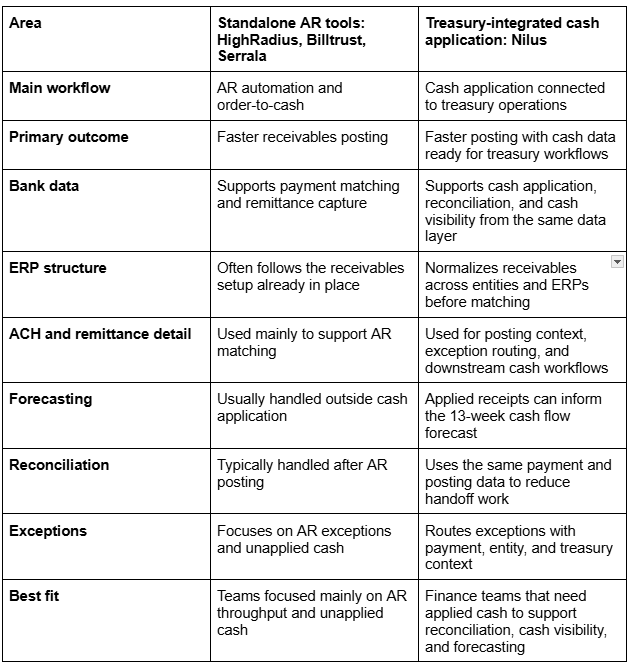
The difference shows up after posting. If your team still has to rebuild the AR view for reconciliation, forecasting, or cash reporting, the automation is stopping too early. Nilus connects cash application to the workflows that come next, so applied receipts don’t need another manual handoff before treasury can use them.
Already evaluating HighRadius, Billtrust, or Serrala? See why mid-market companies choose Nilus instead.
Where connected cash application creates the most value
Connected cash application matters most when payment context is spread across entities, systems, processors, or operating teams. These are the environments where manual matching creates the most downstream cleanup.
PE-backed insurance roll-ups
Insurance roll-ups inherit cash complexity with every acquisition. Each agency may come with its own billing habits, bank setup, policy system, and naming conventions. Without standardization, finance can end up supporting a separate cash application process for each acquired entity long after the deal closes. Automation creates a common way to identify and apply premium receipts, so the parent company can keep integrating new agencies without adding more manual review to the central team.
Healthcare and physician management groups
In healthcare, finance often needs to connect payment activity to the right claim, payer, patient balance, or adjustment. That context does not always live inside accounting. Automation helps carry the relevant payment and adjustment details into finance, so unresolved items don’t bounce between RCM and accounting before they can be cleared.
High-volume ecommerce
Ecommerce cash application usually starts with the settlement. By the time a processor deposit reaches the bank, refunds, fees, chargebacks, reserves, and sales activity may already be compressed into one net cash movement. Finance needs to explain that movement before it slows down close. Automation connects settlement detail to the cash received, so the team doesn’t have to rebuild payout logic from processor exports every cycle.
Franchise and multi-unit businesses
Franchise and multi-unit companies need central finance control without losing location-level detail. Collections may happen locally, but the parent company still needs a consistent way to apply cash and compare performance across units. Automation gives central finance one posting model across locations while preserving the local detail behind deposits, royalties, and customer collections. The parent company gets a cleaner cash view without depending on spreadsheet rollups or one-off follow-ups. Read More: The PE-Backed CFO’s Complete Guide to Treasury Management
FAQs about cash application automation
What is cash application automation?
Cash application automation uses AI and rules-based matching to apply incoming customer payments to open invoices or customer accounts with minimal manual review. It connects bank activity, remittance details, and ERP receivables so that clean receipts can be posted faster.
How does automated cash application work?
Automated cash application works by connecting bank activity, remittance details, and open receivables data, then using matching logic or AI agents to identify which invoices a payment should settle. Clean matches can be posted to the ERP automatically, while short-pays, missing remittance, duplicate references, or entity conflicts are routed for review with the relevant context attached.
What is a good cash application matching rate?
A strong automated cash application workflow may reach 90%+ straight-through posting once payment data, remittance capture, ERP records, and routing rules are well configured. Some mature workflows report 95% or higher, but the useful benchmark is by payment type and customer segment, not one blended match rate. Manual cash application typically achieves 60–75% matching rates.
How many FTEs can cash application automation replace?
Cash application automation can often reduce 1–2 FTE-equivalents of manual work for a 2–3 person cash application team. The exact impact depends on payment volume, exception rate, remittance quality, and ERP setup. The remaining team typically shifts from routine matching and posting to exception review and control work. At $75,000–$100,000 loaded cost per FTE, that can create a strong capacity-based business case, especially when automation helps avoid future hiring or reassign routine matching work.
What is the difference between cash application and bank reconciliation?
Cash application matches incoming customer payments to open invoices or customer accounts. Bank reconciliation compares bank activity with accounting records to confirm that recorded cash matches actual bank movement. Both are critical for the monthly close, but cash application specifically impacts DSO, collections efficiency, and receivable accuracy. Nilus handles both in a single platform.
What is the best cash application software for mid-market companies?
Nilus is one of the best-fit cash application software options for mid-market companies that need payment matching to support more than AR posting. It matches receipts, posts clean payments quickly, and carries applied cash into reconciliation, cash visibility, and short-term forecasting. That makes it a stronger fit for multi-entity finance teams than standalone AR tools that stop after receivables posting.
Does Nilus handle cash application for companies with multiple ERPs?
Yes. Nilus can ingest receivables data from multiple ERPs and normalize it into one view for matching. Incoming payments are matched against the consolidated receivable pool regardless of which ERP holds the original invoice. This is critical for PE-backed companies and roll-ups running 2+ different ERPs across acquired entities.
How does cash application automation improve cash flow forecasting?
Cash application automation improves cash flow forecasting by reducing the delay between cash hitting the bank and cash being reflected in finance data. When receipts are applied sooner, treasury has a cleaner view of collections activity, open cash, and customer payment behavior for the 13-week forecast.