When cash is moving through multiple PSPs, bank accounts, entities, and currencies, reconciliation stops being a clean matching exercise. You’re trying to explain how gross transaction activity became the net cash that reached the bank, and whether the gap is expected or something you need to investigate. Bank reconciliation automation is software that matches bank activity against ERP records, invoices, and settlement data using pre-defined rules rather than manual spreadsheet work. It clears standard reconciliation work before month-end, so your team can focus on the exceptions that need human judgment. Sure, you can do that in Excel - but the work usually lands inside close. Your team is rebuilding payout logic and working through open items while the books are still open. At 5,000 to 50,000+ transactions a month, that starts stretching the process.
How does bank reconciliation automation work?
Bank reconciliation automation applies matching logic to how cash actually settles across bank, ERP, and PSP systems. It uses payout references, invoice IDs, timing windows, fee treatment, and small amount tolerances to determine whether bank activity ties back to the right internal records. That’s what makes reconciliation workable at high volume. Standard settlement activity clears automatically, while mismatches and edge cases are surfaced for review with enough context to resolve them quickly.
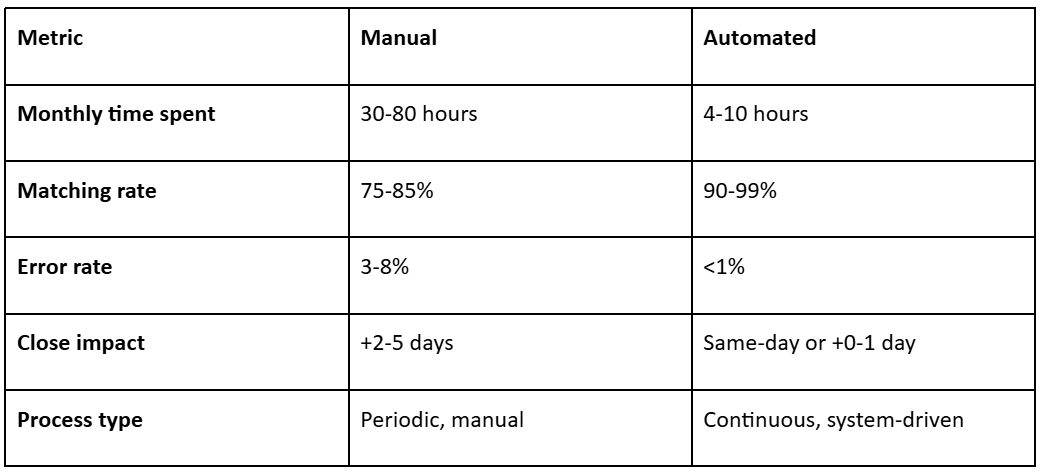
Manual vs. automated reconciliation: what changes?
Use these ranges as directional operating targets.
Why does bank reconciliation break at high volume?
Bank reconciliation starts breaking when routine settlement activity still needs manual review. Net payouts, fees, timing gaps, partial settlements, and FX variances accumulate through the month and end up being worked during close. The issue isn’t transaction count on its own. It’s the growing share of activity that no longer clears through a simple matching process.
1. Timing differences multiply with volume
Not every reconciliation break comes from a real mismatch. A lot of it comes from records arriving on different timelines. A payment may be captured today, included in a settlement file tomorrow, and reach the bank a day or two after that. At lower volume, finance can work through those timing gaps manually. At higher volume, they leave a growing number of valid items open simply because the matching record has not landed yet. That creates drag fast. Review time gets spent checking whether something is actually unresolved or just not ready to clear yet.
2. PSP settlement timing breaks transaction-level alignment
At high volume, the bank usually receives net settlement batches, not one deposit per customer payment. A single payout can include activity from multiple days, plus refunds, chargebacks, reserves, and other adjustments. That means the deposit hitting the bank no longer maps neatly to what sits in the ERP at the transaction level. The reconciliation problem here is structural. Finance has to prove which transactions make up the payout before anything else can be cleared.
3. Fee netting turns standard payout behavior into repeat exceptions
Even after a payout is linked to the right underlying transactions, the amount still may not match cleanly. The ERP records gross activity. The bank receives net cash. Between those numbers sit deductions that vary by PSP, payment method, geography, and commercial terms. If fee treatment isn’t built into the matching logic, a valid payout keeps appearing short. Finance ends up clearing the same type of difference every close, even though the underlying pattern is known.
4. FX differences create constant low-value mismatches
In multi-currency flows, a transaction may be captured in one currency, converted at one rate, and settled at another. The ERP may record the entry at a different point in that sequence. Most variances are minor individually. The operational issue is the volume of them. Without timing rules and tolerance thresholds, small FX items consume reviewer time during close.
5. Multiple systems turn reconciliation into reconstruction
Reconciliation depends on three different records of the same movement: the ERP entry, the PSP settlement detail, and the bank transaction. Each reflects a different stage of the same cash flow. When they don’t align, finance has to work backwards through payout reports, reference fields, deductions, and settlement details to determine how deductions or adjustments were applied. At that point, the reconciliation logic lives too much in reviewer knowledge instead of in the process itself. Once that happens, consistency drops and the process becomes harder to maintain. Automation changes reconciliation by clearing standard settlement activity before month-end. Expected matches are resolved as cash moves through the system, and only the items outside defined logic stay open for review. That leaves you with a smaller unresolved cash population and keeps reviewer time focused on the exceptions that actually need judgment.
Read more: How Cash Management Automation Can Transform Your Business Operations
How do you automate bank reconciliation? A 5-step framework
Your goal is to remove the reconciliation work that still sits inside close. The fastest teams do that by starting with the transaction flows creating the most drag, then expanding coverage once the standard settlement paths are clearing reliably. Here’s the 5-step framework:
1. Start where manual review volume is highest
Don’t try to automate everything at once. Begin with the processors, bank accounts, or entities creating the most manual effort each month. In a multi-entity setup, that often means the areas where unresolved items keep accumulating. Focus the first phase there. Once that review volume comes down, expand the process to the next payout path.
2. Build rule logic around how transactions clear
Next, you’ll set matching logic based on how the transactions actually settle. Customer receipts, processor settlements, refunds, chargebacks, internal transfers, and FX-related items shouldn’t run through the same logic because they clear differently. For each group, define when cash should land, which reference fields should align across systems, where netting happens, and how much variance should still clear automatically.
3. Model processor settlement behavior before expanding coverage
Most of the workload sits in routine settlement activity, not edge cases. Focus first on the payout patterns that keep recurring in close: processor-specific timing, fee deductions, refunds or chargebacks inside the payout, and any reserves or holdbacks. If standard net settlements are still falling into review, the rollout hasn’t removed the main bottleneck.
4. Define exception handling as part of the operating model
Exception handling should be built into the rollout from the start. Decide who can clear which items, what needs controller review, which thresholds trigger escalation, and how long an item can stay open before it becomes a close issue. In a multi-entity structure, that ownership also needs to be clear by entity, account, processor, or exception type. A smaller exception queue still delays signoff if unresolved items sit without a clear path to resolution.
5. Tighten the process based on where review time is still going
After go-live, look at where manual effort is still showing up. Track automated match rate, exception resolution time, exception aging, and how many close days are still tied to reconciliation. Then look underneath those numbers. If one processor, payout type, account group, or entity keeps generating unresolved items, adjust the rule logic there first. You don’t need to solve every edge case at once. The priority is to remove the recurring work that keeps pulling your team back into close. Nilus is built for this exact problem. It gives finance teams one place to reconcile bank, ERP, and PSP activity, while taking standard payout work out of close and leaving only the exceptions that still need review. See how it works in Nilus Reconciliation.
What are good bank reconciliation benchmarks for high-volume teams?
General finance benchmarks help set the floor. CFO.com, citing APQC data, puts median monthly close at 6.4 calendar days, with stronger teams closing in under 5 days and slower teams taking 10 days or more. The same reporting shows general ledger reconciliation taking about 5 hours for stronger teams, 6 hours at the median, and 10 hours for slower teams.
For a high-volume PSP environment like yours, those numbers are only context. The more useful question is what reconciliation should look like once payout timing, fee logic, and settlement rules are working the way they should.
Use the ranges below to judge whether reconciliation is still taking too much reviewer time or adding too much drag to your close.
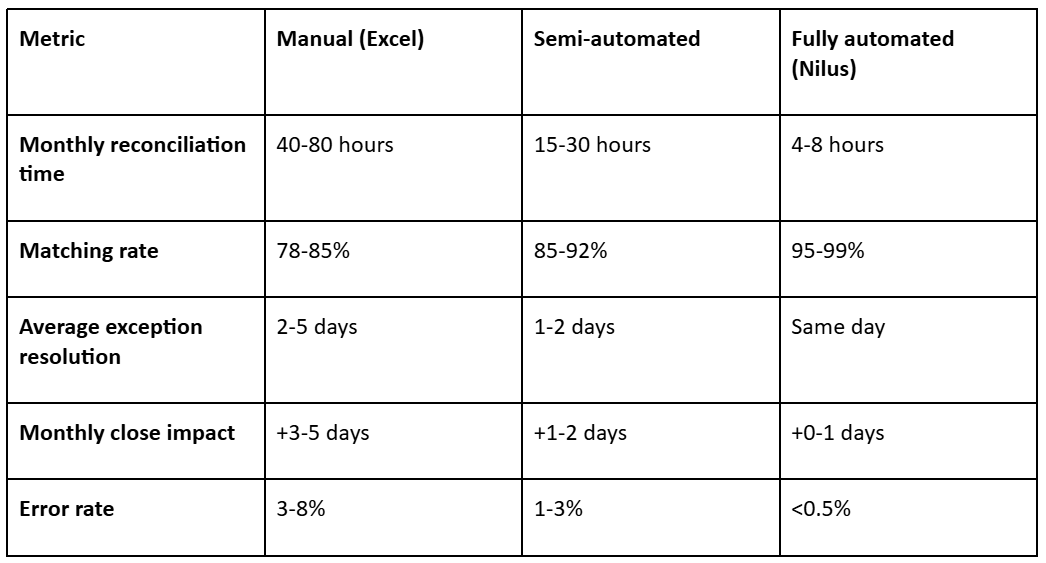
Reconciliation matching rate is the most important reconciliation KPI because it shows how much work the system is removing from finance. Once your main payout flows are modeled correctly, 95%+ automated matching is a reasonable target. But that number only means something if exception volume is falling, reviewer time is coming down, and reconciliation is taking fewer days out of close. See your reconciliation matching rate with Nilus - 30-min demo
What mistakes make bank reconciliation automation fail?
Bank reconciliation automation usually fails for one of two reasons: the matching logic doesn’t reflect how cash actually settles, or the operating model around exceptions is too weak to keep the process current. When that happens, the system may still clear a large share of transactions, but finance keeps doing too much of the work by hand.
1. Widening tolerances to force higher match rates
One of the fastest ways to undermine the process is to make the rules too permissive. Wide amount or timing tolerances may increase the match rate on paper, but they also increase the risk that items clear without enough support. Once reviewers find that happening, they stop trusting auto-cleared items and start rechecking them by hand. That puts manual effort back into the process and weakens confidence in the cleared population. Start with tighter tolerances, then widen them only where settlement behavior is consistent by transaction type, processor, and payout pattern.
2. Failing to model how each PSP settles to cash
Automation breaks down quickly when it can match transactions but cannot explain the movement from gross activity to net cash. That gap usually comes from predictable settlement behavior: fees, reserve holds, refunds netted into the payout, or offsets from prior-day activity. If that logic isn’t built into the rules, the same payout differences keep falling back to finance for explanation. At that point, the system is not removing the work that matters most.
3. Applying one rule structure across dissimilar transaction types
Refunds, chargebacks, reserve releases, FX adjustments, and standard card settlements don’t clear on the same timing or with the same supporting fields. When one matching structure is applied across the full population, simple items may clear, but more complex flows either fall into review too often or clear under rules that are too loose. That creates the worst possible outcome on both sides: too many exceptions where the logic is too rigid, and too little trust where it is too broad. Segmenting the population properly from the start helps you reduce manual review without weakening control.
4. Letting unresolved items build until month-end
If unresolved items are first surfaced at month-end, finance is still absorbing the backlog inside close. By then, payout cycles overlap, unresolved deposits are older, and supporting context is harder to trace. Reviewers are now working through layered differences across multiple days, sometimes across multiple processors or entities. Not every exception needs a same-day resolution. But high-volume settlement flows need to stay current enough that month-end isn’t the first real review point. Once items sit unresolved for weeks, they become slower to clear, not just larger.
5. Measuring success by match rate instead of reduction in close work
Match rate matters, but it only means something if close work is actually coming down. The better question is whether reconciliation is still taking time out of the month-end. To answer that, you need to track:
- Percent of transactions requiring manual review
- Exception aging by transaction type
- Average time to resolve exceptions
- Percent of matched items reviewers reopen
- The number of close days still tied to reconciliation The process only improves when these numbers improve over time. Otherwise the same exceptions keep returning every close, just under a more automated-looking surface.
How to automate bank reconciliation with Nilus
Nilus gives you one place to run reconciliation without rebuilding the process every close. Bank, ERP, and payment-provider data sit in the same system, so your team can apply matching rules, review open items, and tighten the process as patterns emerge. Here’s how to use this multi-bank reconciliation software:
1. Centralize your banks, ERP, and payment providers
Connect the bank accounts, ERP records, and PSP data your team is already pulling together manually. That removes the repeated setup work and gives finance one shared data set to reconcile against.
2. Configure the matching rules around how your cash actually settles
With the data in place, set matching rules based on how transactions clear in practice. That means defining expected settlement timing, the fields that should line up across systems, how processor fees should be handled, and how much variance can still clear automatically. Build those rules by transaction type, processor, or payout flow. If that setup is off, the same payout differences will keep showing up as exceptions.
3. Model the payout paths creating most of the manual work
Don’t start with edge cases. Start with the payout paths creating the most manual work. In most environments, that means processor timing, fee deductions, refunds, chargebacks, and reserves. If those flows are still landing in exceptions, check the setup before you do anything else. The issue usually comes back to timing windows, fee treatment, reference mapping, or tolerance settings. At Made In, Nilus connected fragmented data across platforms and accounts, including NetSuite and Bill.com, and automated reconciliation across high-volume payment flows. That cut reconciliation time from about 20 hours a month to 3 hours, while cutting errors by 90%.
4. Route exceptions into a review process you can control
Matching logic is only part of the rollout. You also need a clear way to move unresolved items through review. Nilus keeps exceptions visible with ownership, status, and review history, so you can see what’s open, who’s handling it, and what could delay close. From there, define which items accounting can clear directly, which need controller review, what should escalate, and how long an item can stay open before it becomes a close risk.
5. Keep monitoring and optimizing the workflow after go-live
Go-live is not the finish line. Once the process is live, look at where finance is still spending time. That usually means checking which payout paths keep generating exceptions, which items take longest to resolve, and which processors, accounts, or entities keep producing repeat work. Then update the rules there first. If one processor keeps generating fee-related differences, or one payout type keeps missing the expected timing window, that’s usually where your next rule update should go. Most high-volume businesses using Nilus achieve 95–99% automated matching rates within the first 30 days. Monthly reconciliation time drops from 40+ hours to under 8 hours. Start your setup.
FAQs about bank reconciliation automation
What is bank reconciliation automation?
Bank reconciliation automation uses software to match bank activity against internal records, clear standard transactions automatically, and flag only the exceptions that still need review. In a high-volume environment, that usually means matching across bank, ERP, and PSP data using rules for timing, references, fees, and expected variance.
How long should bank reconciliation take?
In a manual spreadsheet process, bank reconciliation can take 40–80 hours a month and add 3–5 days to close. In a stronger automated setup, it should drop closer to 4–8 hours a month and add little or no time to close. If reconciliation is still taking multiple days at month-end after the main payout paths are modeled, the process is still carrying too much manual review.
What is a good reconciliation matching rate?
A good automated matching rate is usually 95% or higher once your main payout flows, fee logic, and settlement timing are modeled properly. If your matching rate is below 90%, your rule setup likely needs work. Manual reconciliation typically lands closer to 78–85%.
Can you automate bank reconciliation in Excel?
You can automate parts of bank reconciliation in Excel, but it usually stops holding up once transaction volume gets high. Excel can handle formulas, ad hoc matching, and smaller data sets, but it does not manage PSP settlement logic, exception routing, or ongoing cross-system reconciliation well. Once you’re working across multiple processors, entities, and bank accounts, the manual upkeep usually becomes the bottleneck. Once you’re managing and reconciling cash across multiple processors, entities, and bank accounts, dedicated treasury management software like Nilus is usually the better option.
How does PSP reconciliation differ from standard bank reconciliation?
PSP reconciliation is more complex because the bank usually receives batched net settlements, not one deposit per customer transaction. To tie cash back cleanly, finance has to account for payout timing, fee deductions, refunds, chargebacks, reserves, and FX differences before bank activity matches internal records. As transaction volume grows, those differences stop being occasional exceptions and become part of the normal reconciliation workload.
How does Nilus automate bank reconciliation?
Nilus automates bank reconciliation by connecting your bank, ERP, and payment-provider data into one workflow, then applying configurable rules for timing, references, fees, and expected variance. It keeps unresolved items visible inside a controlled review process, so exceptions stay assigned, traceable, and out of the month-end scramble.