It’s the third Monday of the month. The close starts Friday. You open the bank reconciliation workbook and scroll to the unmatched tab.
1,847 transactions.
You begin the same way as this always does. Bank portal tab open. Stripe dashboard loaded. NetSuite tab open. Second coffee is hot. Time to dive in.
The first transaction is a $14,230.42 deposit from Stripe on the 6th. Now you need to search for the corresponding payout. Find it. It’s net of $387 in fees, which means the actual gross was somewhere around $14,617.
Next, you look up the fee breakdown. You find three refunds buried in there. You note them.
Now, onto the next transaction.
You’ve been doing this for forty minutes. In that time, you’ve matched eleven transactions. Only 1,836 to go.
Multiply 1,847 by twelve months. That’s where your year went.
Reconciliation automation is software that automatically matches bank transactions to invoices, PSP payouts, and ERP records. Eliminating the manual line-by-line work that consumes most of a finance team’s month. Modern AI-native systems auto-tag 85 to 95% of transactions, flagging only exceptions for human review.
In the last 24 months, the matching is no longer the job. Reviewing the 5% the automated system couldn’t match is a more useful job. Most finance teams don’t know it’s possible. The teams that figured it out got their month back, and it means they can start doing more useful work.
What Reconciliation Automation Is (And What It Isn’t)
Reconciliation automation is the automated matching of transactions across bank accounts, ERPs, and PSPs. The most effective way to achieve this is by using AI agents that learn from previous data matches.
Mid-size and enterprise organizations can automate bank reconciliation quickly and easily, with the right software and AI agents. Analysts are still needed, but not to check every transaction if you’ve got the right tool.
And that’s part of the problem. Reconciliation automation is a problem the finance software sector has been trying to solve for some time. Everyone knows that reconciliation shouldn’t take 40 to 100 hours per month for an analyst. Or a further 10 to 15 days for closing, for the average mid-size company.
However, too many software companies have been dressing up faster, better-looking spreadsheets and calling them automation.
Automation is not a reporting tool that still requires manual input. A dashboard that shows you the mismatch without resolving it. That’s marketing, messaging, and a more polished UX. With AI, some of these tools are getting closer to their claims, such as Kyriba and Trovata.
But not to the extent that makes a real difference. Like Nilus did for Alloy, providing the most accurate real-time cash position possible, “while saving their finance team a full day each week, adding up to 50 hours a month.”
The three problems automated reconciliation is trying to solve are:
- Bank reconciliation: Aligning bank transactions with the ledger. A fairly well-understood challenge.
- PSP reconciliation: Matching Stripe, Adyen, and PayPal payouts back to individual invoices, payments, and ERP records.
- Auto-tagging: AI that classifies and matches transactions against known rules and parameters. Learning from prior matches and human corrections.
Unfortunately, auto-tagging, unless it’s implemented by an AI-powered tool that works really well, is quietly driving treasury teams crazy. More often than not, it takes more manual work to resolve the automated reconciliation attempt.
Why Manual Reconciliation Breaks at Scale
There are three main reasons why manual reconciliation stops working at scale.
Volume
A company processing 10,000+ transactions per month across 5 PSPs and 20 bank accounts cannot match manually without a dedicated analyst. Or two. There are only so many transactions one or two people can review before that approach falls apart.
Excel is not built for volume. Not when volume compounds. Transactions are still moving, and accurate reconciliations, closes, or cash flow forecasting becomes unrealistic, impossible, and too resource-intensive.
Timing
Manual reconciliation happens in batches. If you’re disciplined and have the time, it should be daily. Weekly, if you’re realistic (other workloads, tasks, etc.). If and when a discrepancy is discovered, it’s been sitting in the data for days.
Tracing it back, accurately, can take several hours. And you would, but: is that another crisis pinging in Slack?
Fragility
Excel-based reconciliation lives in one person’s laptop. One departure and the institutional memory walks out with them. That’s massive key-person risk. Is that a risk you or your CFO can afford to take?
Probably not.
Genuine automated reconciliation can make a huge difference.
It’s how StackAdapt implemented 95% auto-tagging across 35 accounts, saving them 30+ hours per month.
Automation is how Made In saved 85% of time while reducing errors by 90%.
How Reconciliation Automation Works in 5 Steps
1. Connect
Ingests transaction data from every bank account, PSPs (Stripe, Adyen, PayPal, and any others you use), and the ERP (NetSuite, Sage, SAP, etc).
2. Normalize
A semantic layer translates data from different sources into a unified format so transaction amounts, dates, and identifiers can be compared.
3. Match
An automated, AI-powered reconciliation agent applies rules-based logic to auto-tag and match transactions. E.g., a Stripe payout matches a bank deposit minus fees, within the settlement window.
4. Flag
Unmatched or ambiguous transactions are surfaced for human review and prioritized according to the rules you provide. Higher-value transactions and those that were hours or days ago (or longer) need to be reviewed more quickly. Errors can compound.
5. Learn
An automated, AI-powered system improves match accuracy over time as human corrections feed back into the matching logic. It’s always learning.
This is the human-in-the-loop (HITL) model in practice. The system handles 95% of the work. Your team handles the 5%. The work changes from manually matching to executive judgment.
Want to see how Nilus compares? Review 7 different AI-native treasury reconciliation automation platforms.
Manual vs. Automated Reconciliation, By the Numbers
Here’s what this looks like in practice, and the hours saved by going automated.
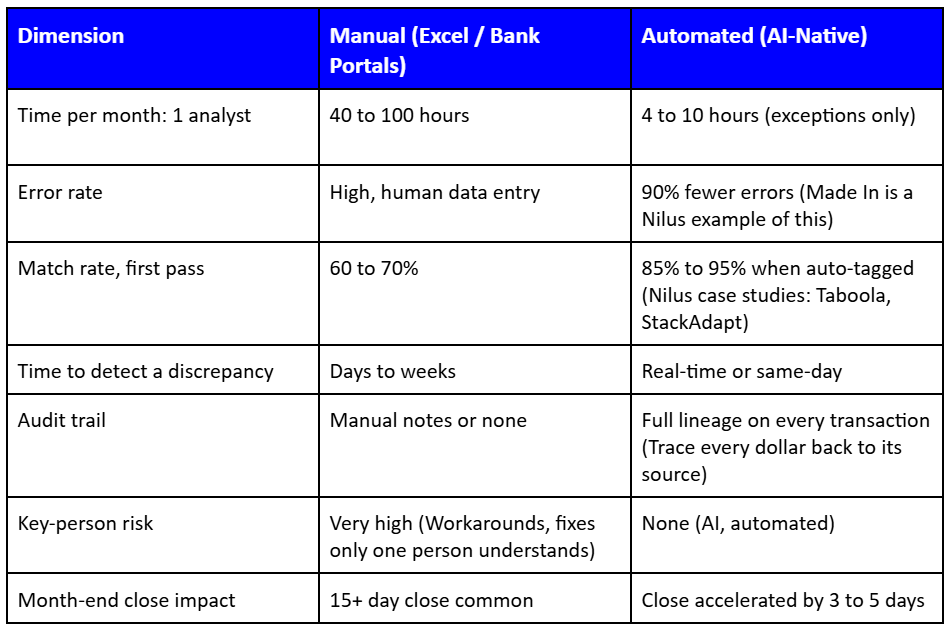
For controllers and finance managers, the cost is more than just the hours worked. Doing the same thing every week and month. The true and greater cost is the delays to closing being finished, constant audit fragility, and keeping an analyst working on something that should be finished a lot quicker.
Reconciliation automation speeds this work up by surfacing the 5% that needs expert human review, so the team can focus on that. It doesn’t eliminate oversight. It eliminates everything that should already be automated.
How much time is your team spending on reconciliation? Calculate your time-saving ROI.
PSP Reconciliation: The Hardest Problem in Modern Treasury
For every fintech, marketplace, and SaaS CFO and treasurer running Stripe, Adyen, and PayPal alongside NetSuite, you know how hard PSP reconciliation is. Every single month. Especially if revenue is going up and to the right.
PSP reconciliation is uniquely painful for the following reasons:
- One line item, hundreds of transactions. Net settlements, rolling reserves, FX movements, fee deductions, refunds, and chargebacks are all recorded as a single line item in bank accounts. A bank reconciliation system records this as a single deposit. Now you’ve got 400 underlying transactions to match. If you’re using a few different PSPs, they’re all speaking different languages.
- Tracing a moving target. One Stripe settlement typically corresponds to hundreds of individual transactions that need to be matched to invoices. Doing this manually is impossible at any real scale. There are also several days since the actual transactions were made, and you might have refunds and chargebacks in that mix. Constant time delays.
- Auto-tagging makes it easier. Auto-tagging is pattern recognition on key data inputs (settlement timing, fee structures, and transaction IDs). These aren’t manual rules. An automated agent learns the shape and dialect of your PSP relationships and matches them.
The accuracy through auto-tagging makes this work a lot easier:
- Flare: 95%+ auto reconciliation accuracy.
- Taboola: 95% auto-tagging across 100+ accounts.
- Freightos: tens of hours saved per month, 15+ accounts.
See more customer success stories.
We need to remember that PSP reconciliation isn’t a harder version of bank reconciliation. It’s a different problem entirely. Platforms that treat them as similar, comparable problems with different datasets fail.
Platforms that are purpose-built for the layered complexities of PSP reconciliation succeed.
See how Nilus reconciles bank, PSP, and ERP data automatically →
What to Look for in Reconciliation Automation Software
Here are the 6 most important criteria to look for in automation software.
If these aren’t present, you aren’t looking at automation and AI; it’s a UX-updated spreadsheet with decent marketing and “AI” (a few clever prompts) thrown in for luck.
1. Auto-tagging rate
What percentage of transactions does the system match without human input? The benchmark is 85% to 95%. That’s enterprise-level production-grade. Below that, or “approximately,” is marketing, and the difference between 5 hours of work and 50. At scale.
2. PSP connector coverage
Does it support your specific PSP stack? Stripe, Adyen, PayPal, Brex, Ramp, etc. Ask for the list. Otherwise, you’re looking at customization, awkward manual configuration, or praying in API.
3. ERP write-back
Does it post matched transactions directly to NetSuite or SAP, or does a human still have to do that? If a human still reconciles post-match transactions, it isn’t automation.
4. Exception workflow
How are unmatched transactions surfaced and routed for review? You need software that automatically includes an approval chain with a clear SLA.
5. Audit trail depth
Can you trace every tagged transaction back to its source rule and the human who approved any exceptions? This dollar-level traceability is essential for SOX and audit readiness.
6. Implementation timeline
Reconciliation automation should be live within 30 to 60 days. Anything that requires 6 months, a consultant, and several developers is not modern automation. It’s legacy software with a new logo.
Reconciliation Automation and the Monthly Close
Close time is one metric every CFO and Controller obsesses over.
According to CFO.com, the median monthly close is 6.4 calendar days, citing APQC data. Stronger teams are closing in under 5 days, and slower teams are taking 10 days or more. 10 to 15 days is normal for mid-market companies.
General ledger reconciliation takes about 5 hours for stronger teams, 6 hours at the median, and 10 hours for slower teams.
Reconciliation is consistently the biggest ticket item within the closing framework. It gets in the way of everything else: journal entries, intercompany elimination, and reporting.
A 5-day improvement in close time equates to 1 to 2 days of analyst time freed up per person per month, multiplied across the team. That’s a genuine time = cost saving.
From the governance perspective, when every transaction has a full audit trail, the close becomes a review, not an investigation. Fewer scary things are hiding in your Treasury Management System.
As Alloy found, 50+ hours were saved every month. Board trust increased. They had a much clearer cash flow visibility, so they could put surplus cash to work.
Reconciliation automation isn’t just an operational improvement. It’s a governance improvement. The hours saved are the visible win. A clearer audit trail is the invisible win, and over time, that one matters even more.
Reconciliation automation doesn’t remove oversight. It surfaces the 5% that needs expert human review so the team can focus on challenges and value-add that AI and automation can’t understand.
See how Nilus auto-tags your transactions. Request a 24-hour proof demo.
Reconciliation Automation Frequently Asked Questions (FAQs)
1. What is reconciliation automation?
Reconciliation automation is software that replaces manual matching of bank transactions against your general ledger entries. It’s a huge time-saver, eliminating spreadsheets, reducing close cycle time, and automatically surfacing exceptions.
For mid-market treasury teams, automation turns the grind of multi-day month-end tasks into a continuous, real-time process. Instead of analysts exporting CSVs and vlookup-ing line items, automation software ingests bank feeds and ERP data directly.
It then applies configurable matching rules and automatically flags only the items that need human review. Your team stops doing the matching and starts managing the exceptions.
2. How does automated bank reconciliation work?
Automated bank reconciliation connects to your bank feeds and accounting system via an API or file-based integration. These then apply rule-based and AI-assisted matching to pair transactions on both sides.
Automation and AI agents automatically flag unmatched items as exceptions for review. The result is a continuously updated reconciliation that doesn’t wait for month-end.
The most effective automation platforms work in three steps:
- Ingest: Pull data from banks, your ERP, and PSPs.
- Match: Apply tolerance rules, date offsets, and pattern logic.
- Report: Exceptions queue, audit trail, and the sign-off workflow.
True automated reconciliation isn’t a faster spreadsheet. It’s a system that does the matching for you and tells you what’s left.
Controllers get a ledger-ready output. Cash managers get a real-time position view. CFOs get a team that isn’t spending 40 hours a month on reconciliation.
3. What’s the difference between bank reconciliation and PSP reconciliation?
Bank reconciliation matches your GL against bank-reported cash movements. PSP reconciliation matches payment processor settlements (Stripe, Adyen, PayPal, etc.) against your order management or billing system.
Both are distinct data flows with different timings, fees, and volume characteristics. The majority of $50M to $500M treasury operations need both.
PSP reconciliation is usually higher-volume and messier:
- Most PSPs (but not all) net fees before remitting.
- Batch settlements don’t map 1:1 to orders.
- Any FX conversion adds another layer of complexity.
On the other hand, bank reconciliation is lower-volume but higher-value. Depending on your customers, of course. If you process significant online revenue, make sure your automation platform supports PSPs and banks.
4. How long does it take to implement reconciliation automation?
For most mid-size to large businesses with a standard ERP and fewer than 50 bank accounts, implementation usually takes 30-60 days from signed contract to live reconciliation. It can take longer, depending on the number of entities, bank connections, ERP customizations, and PSP volume. But even for complex cases, like PE-backed insurance roll-ups, it doesn’t take much longer.
Most of that time is spent on data mapping and UAT, not on software deployment. Your team’s bandwidth during implementation matters as much as the speed we can deliver on expectations.
Estimate 2–4 hours per week from your controller or a senior analyst for the first 6 weeks. SaaS and AI agent platforms with pre-built ERP connectors (NetSuite, SAP, Sage, etc.) reduce timelines compared to custom API builds.
5. What auto-tagging rate should I expect from reconciliation automation software?
A well-configured reconciliation platform should achieve 85–95% straight-through match rates within 60–90 days of go-live. In most cases, only 5–15% of transactions require manual review. Initial rates of 70–80% are normal before matching rules are tuned to your transaction patterns.
Reconciliation automation sits between the bank and the ERP, not on top of either. For this reason, data quality usually impacts match rates more than anything else.
Clean, consistent bank references and GL descriptions push you toward 95%+. Whereas highly manual or descriptive reference fields pull that figure down. When evaluating vendors, ask for match rates on companies that you know will be dealing with similar numbers and complexities.
Remember, a 90% match rate on 10,000 monthly transactions still leaves 1,000 exceptions to clear.
6. Does reconciliation automation replace my ERP or accounting system?
No, reconciliation automation sits alongside your ERP and bank systems. Acting as the matching and exception-management layer between them. Your GL remains the official book of record. A reconciliation platform automates the process of keeping it aligned with external data sources.
Think of it as a workflow tool that connects your bank, PSPs, your ERP, and your team. It’s not a replacement for any of them. What changes is the time it takes to get there and the manual effort your team expends. Most controllers treat this as an operational layer they wish they’d found sooner, not a new accounting system.